Basic guidelines
For all successfully received web requests, I2I API use standard set of HTTP status codes to send response. The most used are:
-
[200 OK]is used for all successfully processed requests. -
[401 Unathorized]For all requests that have to be authorized but fail to do so. In cases when token is missing from header and operation requires basic authentication, status will be[401 Token is not provided]. In cases when user is logged on, but session is expired after some time of inactivity, status[401 The session has expired for the logged-on user]will be send back to the caller. -
[500 Internal Server Error]is send when server-side processing has failed. This status is used as a generic message, sent when no other specific message is more suitable. Details about error are returned in response Body.
Web API object model consists of generic entities containing set of default system properties followed by country and/or customer specific properties. All properties matching data model are contained in collection called Items. These generic data entities allow the same i2i Web API to be used for all insurance products of all Insicon customers.
Standard i2i Web API which comes out of the box with i2i-core product is consumed by both i2i back end (i2i web office) and is offered as an integration point for front ends and other integrations. Due to that fact there is certain amount of metadata in the calls.
How do I create new business objects in i2i?
Creating any business object using i2i Web API requires two method calls:
- Initiate
- Save
Initiate method will give in response JSON formatted business object that you want to create and save in i2i system. Default values configured for specific business object will be already set. Next step is to alter that object and add, change and/or remove values. Altered JSON object should than be saved with call to Save method. As a result, saved business object is returned in JSON format in case of successful method call. Each business object has validation rules that don’t allow objects to be saved without required values, so validation failure can be returned with appropriate description instead of saved object.
All business objects in i2i system are derived from Instance base class, which is derived from BaseEntity.
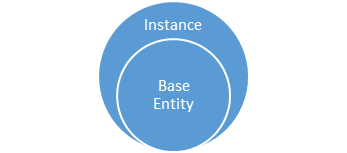
JSON structure for those classes is:
-
BaseEntity
{ "PrimaryKey": "PartyId", //Data model primary key "Id": 2921152, //object identifier "Status": 0, //object status that can take values {-1: Unknown, 0: Unchanged, 1: Added, 2: Changed, 3: Deleted} "Items": { //collection of data model properties } } -
Instance
{
    //BaseEntity properties
    "Guid": "86deaca8-4591-46cc-b215-e6b37b013503",
    "DefinitionId": {...}, //identifier for type of business object
    "VersionId": {...}, //identifier for version of type of business object
    "PartId": {...}, //identifier for model type of business object. It is used to define set of properties for business object type
    "ConfigurationId": {...}, //identifier for configuration of business object
    "Children": [] //collection of Instance objects that have child relation to this Instance object. Children should not be navigated by their ordinal position in the json, but by their $type or by Items -> PartId or PrimaryKey
    "Lookups": {...} //explained in section below What are the Lookups?
}
How can I change a field value from initiate JSON response?
For every i2i business object in JSON format it is possible to find “Items” section that is in fact actual list of columns and values for specific row in database related to that object. For initiated policy that part of JSON will look something with this:
"Items": { //The starting tag in JSON that lists all business object fields/properties
    "PolicyId": { //Name of the item. This name corresponds to column name in database
        "Type": "System.Int32" //Type of item value
    },
    "DefinitionId": {
        "Type": "System.Int32",
        "Value": 108, //This is the current value for the given column.
        "Original": 108 //This is the original value for the given column.
    },
    "VersionId": {
        "Type": "System.Int32",
        "Value": 110,
        "Original": 110
    }//, ...
}
Items – The name of the collection and it exist on every i2i business entity
Type – The .NET representation of the value type. Complete list of built-in types is presented here.
Value – This is the current value for the given column. This value complies with the type stated above. By changing this value, column value is actually changed. In cases when there is no Value tag in JSON, it should be added if it is needed to set column value.
Original – This is the original value for the given column. This original value also complies to the type stated above. In cases when business object is just initiated, with initiate API call, Value and Original Value are usually not present in the JSON data.
What is the structure of person business objects in JSON?
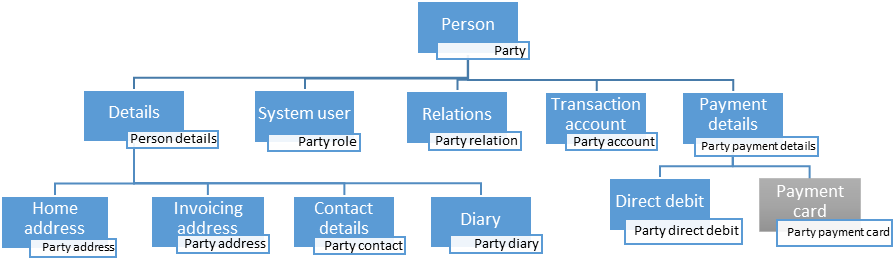
All parties in i2i system can be grouped in 3 main business entities:
- Person
- Organization
- Unit
Basic structure is the same for all party entities except for party details entity that is specific for each of them.
Just like for any other business object in i2i system, parties have Items collection that matches data model.
Following party hiararchy, each of children elements has its own Items collection. Most important and commonly used properties (items) are explained in JSON below that is taken from get person response:
-
Person
{ "$id": "1", "$type": "I2I.Logic.Component.PartyAdministration.Entity.Person, I2I.Logic.Component.PartyAdministration.Entity", "Relations": [], //collection of PartyRelation objects that are used to establish a relation between two Party objects (like relation between Employee and Employer, Broker agency and Broker, etc.) "PrimaryKey": "PartyId" : {...}, "Items": { "PartyId" : {...}, // Party identifier (technical) "PartyNumber" : {...}, // Unique party number, assigned by i2i on creation "PartyStatus" : {...}, // party status can that one of fallowing values {1 – Active, 2 – Not active, 3 – Deceased, 4 – Prospect, 5 – Blacklisted, 6 - Forgotten } //... } "Children": [ { "$type": "I2I.Logic.Component.PartyAdministration.Entity.PersonDetails, I2I.Logic.Component.PartyAdministration.Entity", //... }, { "$type": "I2I.Logic.Component.PartyAdministration.Entity.PartyRole, I2I.Logic.Component.PartyAdministration.Entity", //... }, { "$type": "I2I.Logic.Component.PartyAdministration.Entity.PartyAccount, I2I.Logic.Component.PartyAdministration.Entity", //... }, { "$type": "I2I.Logic.Component.PartyAdministration.Entity.PartyPaymentDetails, I2I.Logic.Component.PartyAdministration.Entity", //... }, ], "Lookups": {...} } -
PersonDetails
{ "$type": "I2I.Logic.Component.PartyAdministration.Entity.PersonDetails, I2I.Logic.Component.PartyAdministration.Entity", "PrimaryKey": "PersonId", "Id": 2897944, "Status": 0, "Items": { //... "PersonNumber" : {...}, //Unique person number (country specific) "FirstName" : {...}, //First name "LastName" : {...}, //Last name "Gender" : {...}, //Gender value that can take values {“F” – Female, “M” - Male} "DateOfBirth": {...} //Date of birth //... }, "Children": [ { "$type": "I2I.Logic.Component.PartyAdministration.Entity.PartyAddress, I2I.Logic.Component.PartyAdministration.Entity", "PrimaryKey": "PartyAddressId", "Id": 5866143, "Status": 0, "Items": { //... "AddressType": { //... "Value": 0, //Value indicating type of party address that can take values {0 – Postal (Homel) address, 1- Invoicing address, 2 – Street/visiting address} where Street/visiting address type exists for Organizations only }, "ValidFrom": {...}, //Party addresses are versioned by validity period defined with properties ValidFrom and ValidTo "ValidTo": {...} //The last/current address has ValidTo value “2999-12-31”. When address is changed it’s added as new record valid of that day, while previous address validity end the day before //... }, "Instance": { "$type": "I2I.Logic.Component.EntityHandling.Entity.RootInstance, I2I.Logic.Component.EntityHandling.Entity", "PrimaryKey": "AddressId", "Id": 5871415, "Status": 0, //... "Items": { //... "AddressId": {...}, //technical identifier "Address1": {...}, //Address line 1 "Address2": {...}, //Address line 2 "Address3": {...}, //Address line 3 "Address4": {...}, //Address line 4 "PostNumber" : {...}, //Postal area code "City" : {...}, //City "Country" : {...} //Alpha-2 code of the country (ISO 3166-1) }, }, }, { "$type": "I2I.Logic.Component.PartyAdministration.Entity.PartyAddress, I2I.Logic.Component.PartyAdministration.Entity", "PrimaryKey": "PartyAddressId", "Id": 5866143, "Status": 0, "Items": { //... "AddressType": { //... "Value": 1, //Value indicating type of party address that can take values {0 – Postal (Homel) address, 1- Invoicing address, 2 – Street/visiting address} where Street/visiting address type exists for Organizations only }, "UsePostalAdress": {...}, //Value indicating whether data in PartyAdreess with AddressType =0 will be used for current address type. If this is set to true, then all data with AddressType =0 will be copied to current address element upon save. "ValidFrom": {...}, "ValidTo": {...} //... }, "Instance": { "PrimaryKey": "AddressId", "Id": 5871415, "Status": 0, //... "Items": { //... "AddressId" : {...}, //technical identifier "Address1" : {...}, //Address line 1 "Address2" : {...}, //Address line 2 "Address3" : {...}, //Address line 3 "Address4" : {...}, //Address line 4 "PostNumber" : {...}, //Postal area code "City" : {...}, //City "Country" : {...} //Alpha-2 code of the country (ISO 3166-1) }, }, }, { "$type": "I2I.Logic.Component.PartyAdministration.Entity.PartyContact, I2I.Logic.Component.PartyAdministration.Entity", "PrimaryKey": "ContactId", "Id": 2920324, "Status": 0, "Items": { //... "Email": {...}, //email address "Email_2": {...}, // alternative email address "Email_3": {...}, // alternative email address "DayPhone": {...}, // phone number for day-time calls "HomePhone" : {...}, // home phone number "MobilePhone" : {...}, // cell phone number "Fax" : {...}, // fax number "FirstName" : {...}, // contact First name "LastName" : {...}, // contact Last name "PersonTitle" : {...}, // contact Title "DistributionChannel" {...}, // Channel that shall be used for correspondence. Supported values are (1 – Print, 101 – Email, 201 - Online) } } ] } -
PartyRole
Each person can have multiple party roles that define his business role in i2i system. Supported values are (SystemUser, Agent, Intermediary, OwnerEmployee, WebPortalUser, PrivatePerson, InternalIntermediary, SeconderyIntermediary, Sponsor, ProtectedIdentity, ...)
Each person has at least SystemUser role which is followed by i2i user entity needed for security/sharing functionality in i2i. System user role may also come with credentials for i2i system authentication or connection to an external authentication method.
{ "$type": "I2I.Logic.Component.PartyAdministration.Entity.PartyRole, I2I.Logic.Component.PartyAdministration.Entity", "PrimaryKey": "SystemUserId", "Id": 1038, "Status": 0, "Items": { "SystemUserId": {...}, //technical identifier "UserId": {...}, //i2i user entity identifier }, "Lookups": { "Items": { //... "Username" : {...}, //username of i2i user entity }, //... } } -
PartyAccount
{ "$type": "I2I.Logic.Component.PartyAdministration.Entity.PartyAccount, I2I.Logic.Component.PartyAdministration.Entity", "PrimaryKey": "PartyTransactionAccountId", "Id": 4031347, "Status": 0, "Items": { //... "EmbeddedInstanceId" : {...}, //technical identifier of the Transaction account of this party in the system //... } } -
PartyPaymentDetails
{
    "$type": "I2I.Logic.Component.PartyAdministration.Entity.PartyPaymentDetails, I2I.Logic.Component.PartyAdministration.Entity",
    "PrimaryKey": "PaymentDetailsId",
    "Id": 997652,
    "Status": 0,
    "Items": {
        "BankAccountNumber" : {...}, // bank account number
        "ClearingNumber" : {...}, // bank clearing number
        "BankPaymentType" : {...}, // type of payment that can take values (0 - Cash, 1 - Bankgiro, 2 - Plusgiro, 3 - BankAccount, 4 - DirectDebit, 5 - PaymentCard, 6 - PaymentNotice, 7 - ForeignPayment, 8 - Personkonto)
        "BankName" : {...}, // bank name
        "IBAN":{…}, // International Bank Account Number
        "IBANCurrency": {...}, // currency for IBAN
        "SWIFT": {...}, // International Bank identifier code - BIC
        "BankGiro": {...}, // account number in a proprietary giro clearing system (Sweden: Bankgirot)
        "PlusGiro": {...}, // account number in a proprietary postal giro clearing system (Sweden: Plusgirot)
        "EinvoiceId": {...}, // electronic invoice number
        //...
    }
    "Children": [
        {
            "$type": "I2I.Logic.Component.PartyAdministration.Entity.PartyDirectDebit, I2I.Logic.Component.PartyAdministration.Entity",
            "PrimaryKey": "PartyDirectDebitId",
            "Id": 77323,
            "Status": 0,
            "Items": {
                //...
                "BankAccountNumber": {...}, // bank account number
                "ClearingNumber" : {...}, // bank clearing number
                "BankName" : {...}, // bank name
                "PaymentPeriod" : {...}, // payment period that can take values (1: Annual, 2: HalfYear, 4: Quarter, 12: Month)
                "PaymentMethod": {...} // method of payment that can take values (3 - Autogiro, 8 - AvtaleGiro)
                //...
            }
        },
        {
            "$type": "I2I.Logic.Component.PartyAdministration.Entity.PartyPaymentCard, I2I.Logic.Component.PartyAdministration.Entity",
            "PrimaryKey": "PartyPaymentCardId",
            "Id": 1101,
            "Status": 0,
            "Items": {
                //...
                "CardLast4": {...}, // last 4 numbers in card number
                "ExpirationYear": {...}, // card expiration year
                "ExpirationMonth": {...}, // card expiration month
                "CardId": {...}, // identifier of the card at the payment service provider
                "IsDefault": {...}, // flag whether this is the default card, in case of multiple cards of the same party
                "PaymentCardServiceId": {...}, // payment service provider
                "PaymentCardStatus": {...}, // {1: Active, 2: Expired, 3: Inactive}
                //...
            },
            //...
        }
    ]
}
What is the structure of organization business objects in JSON?
As mentioned in previous section, Organization structure is almost the same as Person structure except for entity details object that is of type definition organization details, and his child street address.
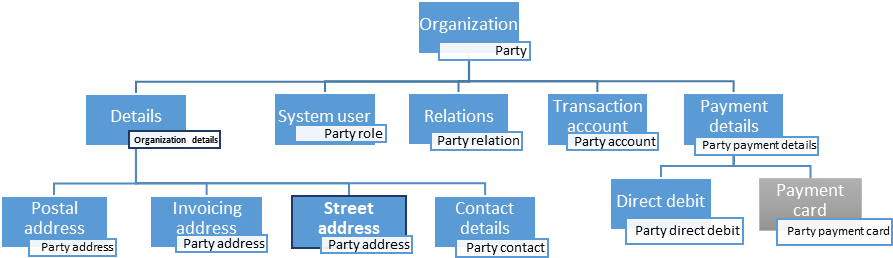
Those two exceptions are shown below:
-
Organization details
{ "$type": "I2I.Logic.Component.PartyAdministration.Entity.OrganizationDetails, I2I.Logic.Component.PartyAdministration.Entity", "PrimaryKey": "OrganizationId", "Id": 24309, "Status": 0, "Items": { //... "OrganizationName": {...}, // organization name "OrganizationNumber": {...}, // organization identification number "VATnumber": {...}, // registered tax identification number for organization "Department": {...}, // department name "SNIKoder": {...}, // Swedish Standard Industrial Classification code "NumberOfEmployees": {...}, // number of employees "CorporateCode": {...}, // corporate code/number in another external registry (e.g. insurance company code in VTR, TFF) "LegalForm": {...}, // legal form of the organization //... } } -
Street address
{
    "$type": "I2I.Logic.Component.PartyAdministration.Entity.PartyAddress, I2I.Logic.Component.PartyAdministration.Entity",
    "PrimaryKey": "PartyAddressId",
    "Id": 5866143,
    "Status": 0,
    "Items": {
        //...
        "AddressType": {
            //...
            "Value": 2, // Value indicating type of party address that can take values {0 – Postal (Home) address, 1 - Invoicing address, 2 – Street/visiting address} where Street/visiting address type exists for Organizations only
	    },
        "UsePostalAdress": {...}, – Value indicating whether data in PartyAdreess with AddressType = 0 will be used for current address type. If this is set to true, then all data with AddressType =0 will be copied to current address element upon save.
        "ValidFrom": {...},
        "ValidTo": {...}
	    //...
    },
    "Instance": {
        "$type": "I2I.Logic.Component.PartyAdministration.Entity.PartyAddress, I2I.Logic.Component.PartyAdministration.Entity",
        "PrimaryKey": "AddressId",
        "Id": 5871415,
        "Status": 0,
        //...
        "Items": {
            //...
            "AddressId" : {...}, // technical identifier
            "Address1" : {...}, // Address line 1
            "Address2" : {...}, // Address line 2
            "Address3" : {...}, // Address line 3
            "Address4" : {...}, // Address line 4
            "PostNumber" : {...}, // Postal area code
            "City" : {...}, // City
            "Country" : {...} // Alpha-2 code of the country (ISO 3166-1)
        }
    }
}
What is the basic structure of insurance business objects in JSON?
All policy and quote instances will have same basic structure in JSON:
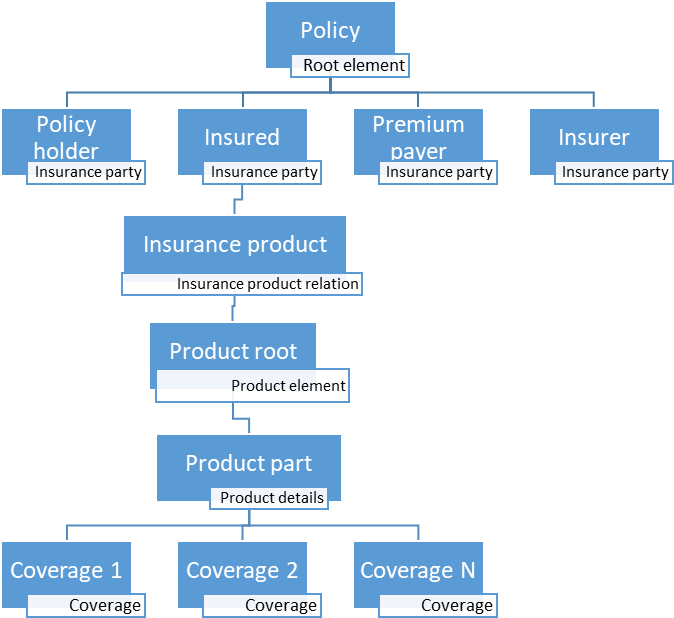
PolicyHolder, Insured, PremiumPayer and Insurer are direct descendants of the Policy element and they are part of the policy Children collection in JSON request/response. When saving policy, it is necessary to set PolicyHolder, Insured and Premium payer elements to point out to the signed in user. All users upon signing-in to i2i, will have PartyId field set (check Login response example) and this value needs to be used for insurance parties EmbeddedInstanceId value. EmbeddedDefinitionId value in this case will always have value 1 which is a statement that this party is in fact person, and not an organization or organization unit. 4th insurance party called Insurer is not mandatory – it is only relevant to broker companies.
ProductPart is maybe the most interesting element in the policy structure since that is the place where all specific product details are.
Below Product details, list of coverages can be found. This list heavily depends on business package that is used for creating this insurance.
How can I register a new person in i2i?
If you want to register a new Person business object in i2i system using i2i Web API, you need to follow steps described in How do I create new business objects in i2i? using method calls specific to Party business module:
- Initiate party with definitionId = 1
- Alter JSON response and add values, as described in: How can I change a field value from initiate JSON response?
- Save altered response using call to Save method
How can I remove coverage element from insurance?
When initiating or retrieving quote/policy data, complete structure of an insurance is returned in JSON format. On specific level of hierarchy, as defined in i2i Designer, insurance coverages can be found. Those sections of JSON will look like this:
"Children": [
    {
        "$id": "15",
        "$type": "I2I.Logic.Component.Products.Entity.Coverage, I2I.Logic.Component.Products.Entity",
        "Guid": "d90c9b95-397b-4ec7-8f8d-dc101a6f6bd9",
        "Children": [], // The list of subcoverages, if any
        "Parent": {
            "$ref": "9"
        },
        "Lookups": { }, // List of coverage lookups
        "PrimaryKey": "MTPLInsuranceId", // The name of the item used to uniqly identify instance in i2i database
        "Id": 154146, // The value of primary key item
        "Status": 0, // State of a business object, whether it is unchanged, added, changed or deleted
        "Items": {
            "MTPLInsuranceId": {
                "Type": "System.Int32",
                "Value": 154146,
                "Original": 154146
            },
            "DefinitionId": {
                "Type": "System.Int32",
                "Value": 2500071,
                "Original": 2500071
            },
            "VersionId": {
                "Type": "System.Int32",
                "Value": 2500080,
                "Original": 2500080
            },
            "PartId": {
                "Type": "System.Int32",
                "Value": 2000192,
                "Original": 2000192
            },
            "ConfigurationId": {
                "Type": "System.Int32",
                "Value": 2501694,
                "Original": 2501694
            },
            "ParentPartId": {
                "Type": "System.Int32",
                "Value": 2500014,
                "Original": 2500014
            },
            "ParentId": {
                "Type": "System.Int32",
                "Value": 1254943,
                "Original": 1254943
            },
            "RootId": {
                "Type": "System.Int32",
                "Value": 1412186,
                "Original": 1412186
            },
            "AnnualPremium": {
                "Type": "System.Decimal",
                "Value": 1200,
                "Original": 0
            },
            "Premium": {
                "Type": "System.Decimal",
                "Value": 1200,
                "Original": 0
            }
        }
    }
]
If a coverage was not already saved, then its complete JSON element can be removed. This is distinguished by value of the “Status”. Status value 1 “Added” means that it was not saved.
If a coverage was already saved (Status is different than 1) then the Status needs to be set to 3 (“Deleted”) and sent like that to the Save method
Complete list of possible Status values for any i2i business object is stated below:
- Unknown = -1,
- Unchanged = 0,
- Added = 1,
- Changed = 2,
- Deleted = 3
What are the Lookups?
Lookups are most commonly used for containing values of related entities which are not fully loaded with the current entity. A typical example is policy holder’s name on policy entity. Lookup values exist on GET calls, while on INITIATE calls they are mainly empty. Lookups can appear on any level of quote/policy hiearachy and its structure is like this:
"Lookups": {
    "$id": "16",
    "Status": -1,
    "Items": {
    "PartyName": { - The name of the lookup
        "Type": "System.String",
        "Value": “John Doe”, - This field reflects the value of PartyName lookup
        "Original": “John Doe”
    },
    //...
}
For complete list of lookups on various levels of an insurance, please see JSON responses in Quotation and Policies APIs.
How can I attach a photo image to field value in JSON request?
Photo can be added to element in JSON only as base64 string. Usually, photo fields can be distinguished with value for Type JSON tag - it is always: “System.Byte[]”. By simply setting Value tag with image base64 text representation, image content will be saved in database. There are some online converters that can be used as a check of base64 string encoding, like base64-image.de which will generate data acceptable by i2i web API (this tool will append some prefix for image converters that are used, like “data:image/jpg;base64,” but this prefixes should not be used when sending requests, only pure base64 string representation of the image).